Marketing Automation for Home Services: 2026 Guide
Marketing Automation for Home Services: 2026 Guide ! Home services owner uses automation tools in office If you run a home service business, you already know how fast a lead can disappear.

If you run a home service business, you already know how fast a lead can disappear. Research shows that 28% of business calls in home services go unanswered, and 78% of consumers will abandon a business after just one missed call. That is revenue walking out the door before you even know it was there. Marketing automation for home services closes this gap by responding to leads instantly, nurturing them consistently, and freeing you to focus on the actual work. This guide walks you through exactly how to set it up.
Key Takeaways
| Point | Details |
|---|---|
| Clean data comes first | Automation fails without accurate CRM data. Fix your records before touching any software. |
| Speed beats perfection | Automated lead responses within 90 seconds outperform manual callbacks made hours later. |
| Segment your email lists | Personalized follow-ups based on service interest convert far better than mass broadcasts. |
| Local SEO needs automation too | Nearly half of all Google searches have local intent, making automated local campaigns critical. |
| Audit regularly | Monthly checks on routing, integrations, and response rates keep your automation performing. |
Marketing automation for home services: what to set up first
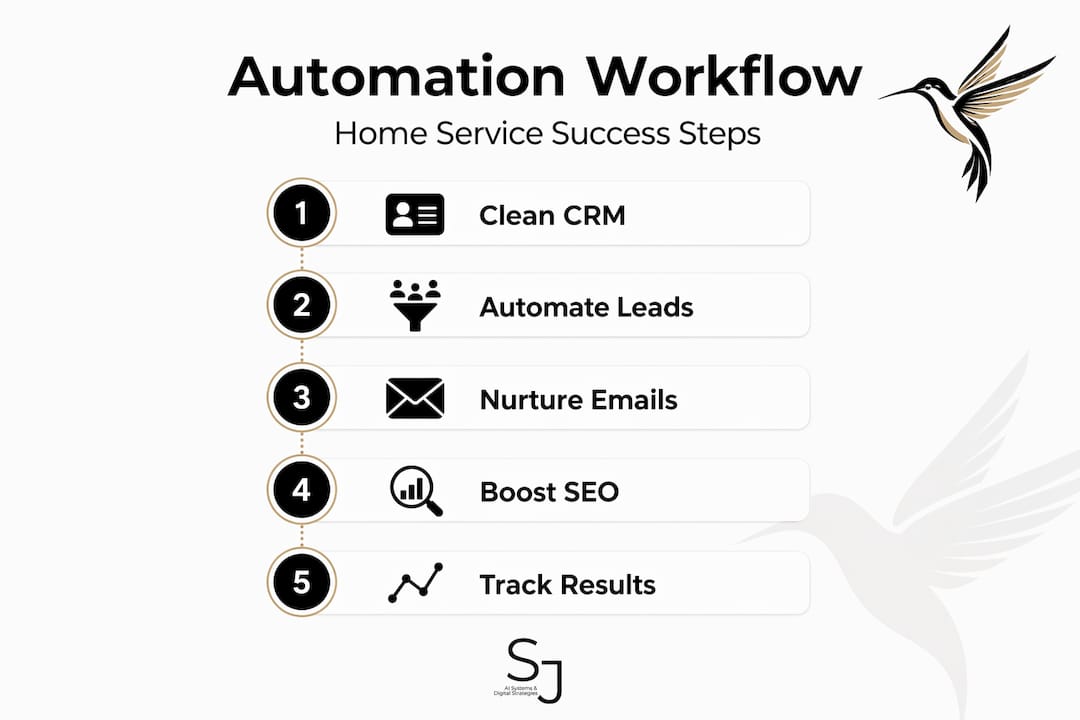
Before you flip any switches, you need the right foundation. Skipping this step is the single most common reason automation fails for contractors and landscapers.

Your CRM data has to be clean. According to research on top CRMs for landscaping, cleaning customer data often takes longer than installing the software itself. Duplicate contacts, missing phone numbers, and untagged lead sources all break automation rules downstream. Spend time here first.
Choosing the right CRM matters just as much. Look for platforms built or configured for home services. You want one that tracks job types, service zones, and seasonal demand patterns. Generic CRMs designed for software sales teams will not give you the field you need without heavy customization.
Before you build any automation rules, map your best customers. Where did they come from? Which services did they first request? What neighborhood are they in? These answers tell you which lead sources to prioritize and how to write your automation triggers.
- Identify your top three lead sources (Google Ads, website forms, referrals, etc.)
- Tag all contacts by service type, location, and lead source inside your CRM
- Confirm your CRM connects directly to your email platform and communication tools
- Test one integration before building any automated sequence
Pro Tip: Set aside one full afternoon to audit your CRM before launch. Export your contact list, remove duplicates, and fill in missing fields. This single step will save you weeks of troubleshooting later.
How to automate lead capture and routing
Once your data foundation is solid, this is where marketing automation starts earning its keep.
- Connect every lead source to your CRM. Website forms, Google Ads lead extensions, and phone calls all need to feed into one place. Nothing should require manual entry.
- Set up lead scoring rules. Score leads by service type, geographic zone, and urgency level. A request for emergency tree removal scores higher than a general inquiry about spring cleanup pricing.
- Automate instant notifications. Research confirms that effective lead routing includes automated notifications sent to the right team member within 90 seconds of a new lead coming in. That speed is the difference between winning and losing the job.
- Deploy an AI receptionist or chatbot. A chatbot on your site can answer after-hours inquiries, collect contact information, and book appointments without any human involvement. Setup time for an AI receptionist forwarding system averages about 45 minutes, making it one of the fastest wins available.
- Test your routing with real scenarios. Run five mock leads through your system before going live. Check that each one lands in the right inbox, triggers the right notification, and logs correctly in your CRM.
| Lead Type | Routing Destination | Response Method |
|---|---|---|
| Emergency service request | Owner or on-call tech | Immediate SMS + call |
| Free estimate inquiry | Sales or scheduler | Automated email + follow-up call |
| General question | Chatbot or email queue | Automated reply within 5 minutes |
| Repeat customer request | Account owner | Personalized automated email |
Pro Tip: Contractors using lead response automation report reclaiming 3 to 5 hours per week. Use that time for job site visits or client calls, not inbox management.
Building email nurture sequences that actually convert
Automated emails only work when they feel relevant. A sequence that says "Hey, thanks for your interest!" and then pitches a discount four days later does not build trust with someone considering a $4,000 landscaping project.
Here is how to build sequences that move leads forward without pushing them away:
- Trigger sequences based on behavior. Someone who clicks your seasonal lawn care offer gets a different sequence than someone who downloaded your pricing guide. Your CRM should fire these triggers automatically.
- Segment by service interest. A homeowner asking about irrigation systems has different concerns than one asking about weekly mowing. Personalized messaging based on service type dramatically improves open rates and replies.
- Schedule smart follow-ups. If a lead opens your first email but does not respond, trigger a follow-up two days later. If they click a link, move them to a higher-intent sequence. These rules take minutes to set up and pay off every time.
- A/B test your subject lines. Most email marketing tools let you split-test subject lines automatically. Test two versions on 20% of your list, then send the winner to the rest. Do this monthly.
- Keep your brand voice. Automation does not mean robotic. AI should assist with repetitive tasks but humans must review content for brand tone and local relevance. Write your email templates yourself, then let automation handle the scheduling and triggers.
Automating local SEO and ad campaigns
Local search is where home service leads are born. Research shows that 46% of Google searches carry local intent, and 76% of "near me" searches lead to a business contact within 24 hours. If your business is not showing up and responding fast, a competitor is.
Here is how automation fits into your local strategy:
- Automate Google Business Profile updates. Tools exist that sync your service offerings, hours, and promotions automatically. Stale listings hurt your local rankings.
- Use automated budget pacing for ads. Set your Google Ads budget to spend more during peak hours (morning and lunch when homeowners search) and pull back overnight. This is a setting most contractors never touch.
- Let AI handle keyword bidding, with your oversight. AI-driven bidding tools adjust bids in real time based on conversion likelihood. But you need to check the results weekly. Fully hands-off ad management is how budgets disappear without results.
- Close the loop on conversion tracking. Every phone call and form submission needs to be tied to a specific campaign. Without this, you cannot tell which ads are generating real revenue and which are burning cash.
For a deeper look at how ad automation fits together for contractors, ad automation strategies covers the setup in detail.
Verifying and optimizing your automation performance
Setting it up is step one. Keeping it working is the actual job.
- Track lead response time weekly. Your goal is under five minutes for every new inquiry. If your average is creeping up, check your notification settings and routing rules first.
- Review CRM data quality monthly. Bad data breaks good automation. Look for contacts missing tags, leads sitting in the wrong pipeline stage, and incomplete job records.
- Audit your integrations quarterly. Tools update. APIs break. A CRM that connected perfectly to your email platform six months ago may have a broken field mapping today. A 30-minute check every quarter prevents silent failures.
- Read customer replies to your automated emails. If people are replying "why are you sending me this?" your segmentation needs work. Customer feedback is the fastest signal that something is off.
- Update your automation rules as your services change. Added a new service? Opened a new service area? Your routing rules, email sequences, and ad targeting all need to reflect that.
My honest take on automation for home services
I have worked with home service businesses long enough to spot the mistake that trips up almost everyone: they automate first and think about brand trust second.
In my experience, the contractors who get the best results from automation are not the ones with the most sophisticated tech stack. They are the ones who spent time writing genuine email templates, setting honest expectations in their chatbot responses, and checking their automation results every week. Automation handles the volume. You still provide the judgment.
The other thing I have seen hurt businesses is over-relying on AI-generated content without editing it for local context. Your customers are your neighbors. They notice when an email sounds like it was written for someone three states away.
Start with one workflow. Get it right. Then expand. The businesses that try to automate everything on day one almost always end up with a mess that costs more time to untangle than the old manual process ever did. Small, tested steps build systems you can actually trust.
— Sharon
Let Sharonjerman help you build it right
At Sharonjerman, we work specifically with home service businesses to design and deploy marketing automation that fits how you actually operate. That means custom chatbots that reflect your brand voice, AI receptionist setup, CRM integration, and Google and Meta ad campaigns with real conversion tracking built in. We do not hand you a generic template and walk away. We build the system with you, test it against your real lead flow, and stay involved as your business grows. If you are ready to stop losing leads to competitors and start running a smarter operation, explore our home service automation solutions and book a free consultation to see exactly what is possible for your business.
FAQ
What is marketing automation for home services?
Marketing automation for home services uses software to handle repetitive tasks like lead capture, follow-up emails, appointment reminders, and ad management automatically, so you spend less time on admin and more time on jobs.
How fast should an automated lead response go out?
Research shows that notifications within 90 seconds of a new lead submission dramatically improve conversion rates. Any longer and the lead is already calling someone else.
What is the first step to automate landscaping leads?
Clean your CRM data first. Tag all existing contacts by service type, location, and lead source before building any automation rules. Without accurate data, your automation will route leads incorrectly and send irrelevant emails.
How much time does marketing automation actually save?
Contractors who implement lead response automation consistently report reclaiming 3 to 5 hours per week, time previously spent on manual follow-up and scheduling tasks.
Do I need a big budget to start automating my home service marketing?
No. Start with an AI chatbot on your website and one automated email follow-up sequence. Both can be set up for a low monthly cost and deliver measurable results before you invest in more advanced tools.